How to make a contract on your phone
Vishwen Labs
Drafting a contract on a phone takes about ten minutes: choose a template that matches the deal, fill in the parties and the terms, read the rendered document rather than the form, sign, export a PDF and send both sides the same file. The steps below are Contract Maker's, and the checks between them are the part that matters, because a document generated in a hurry and signed unread is worth less than the time it saved. General information, not legal advice; for anything important, have a lawyer in your state read it before you sign.
Drafting a contract on your phone with Contract Maker
- Pick the template that matches the deal. Browse the ten categories or search. Read the one-line summary and check whether the template has a version for your state; the page says which states it has been tuned for and that it is a draft no attorney has reviewed.
- Add the parties. Enter both sides with their full legal names and addresses, or pull one in from the party book, which can import a single contact through Apple's own picker. Contracting with the wrong entity is the mistake that only shows up when you need to enforce something.
- Fill in the terms. Dates, amounts, term, notice periods, and the options the template offers such as whether to include arbitration. Where a field asks which state's law applies, use the state with a real connection to the deal.
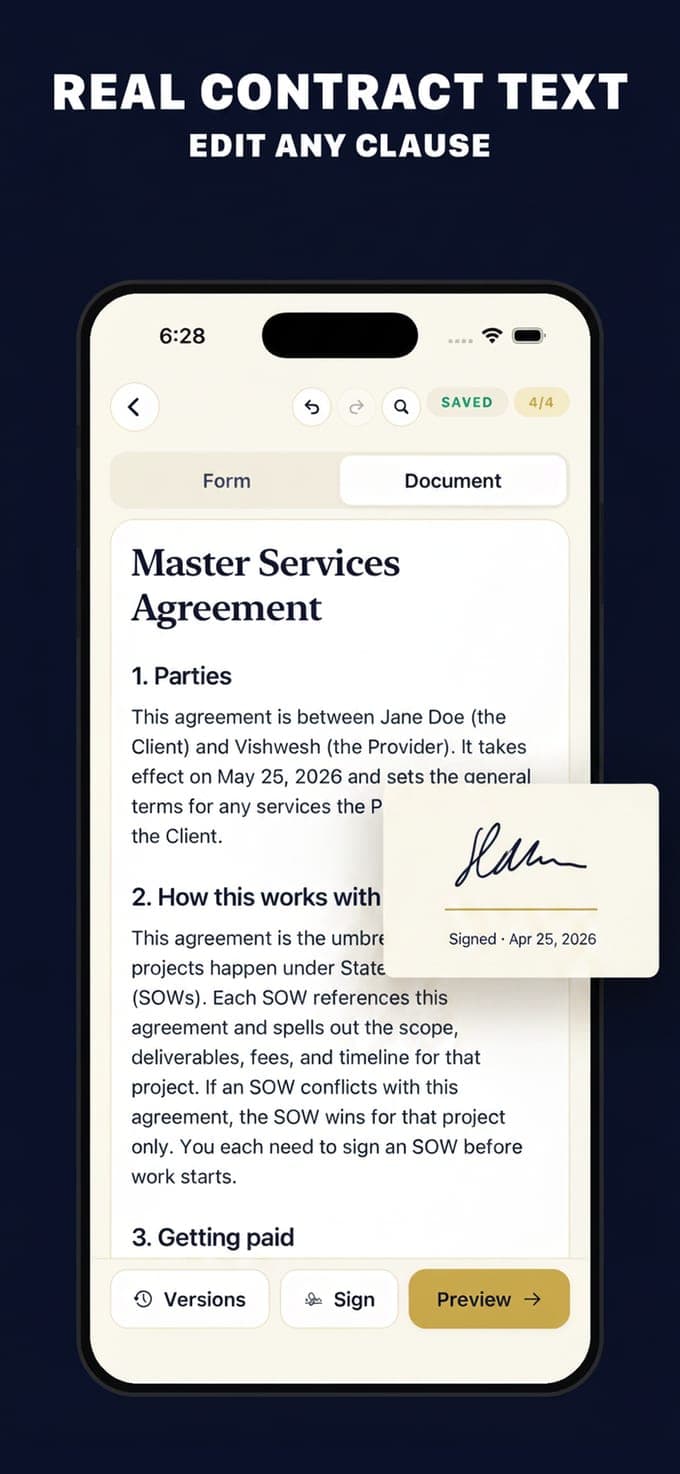
- Read the Document tab, not the form. Switch from Form to Document and read the agreement as it will print. Explain can put a clause into plainer words and Rewrite can simplify one, ten times a day on the free tier. If a sentence does not say what you meant, fix the field behind it.
- Check the parts people skip. Payment terms and dates, what happens if either side ends it early, who owns what at the end, and the governing law clause. These four cause most disputes.
- Sign and have the other side sign. Sign with a finger, then hand the phone over for the second signature, or export and send it for signing. Electronic signatures are recognised for most documents in the United States, with exceptions such as wills.
- Export and send both sides the same file. Export a PDF, Word file, plain text or Markdown through the share sheet and send the identical file to everyone who signed. Free exports carry a watermark and are limited to one a day; Pro removes both.
- Keep it where you will find it. The app keeps the draft, its versions and the signatures on the phone, with folders and tags. There is no cloud copy, so store the exported PDF somewhere you back up.
Why the Document tab matters
A form makes it easy to answer questions without reading the sentences they build. The rendered document is the thing that binds you, and reading it end to end is the only way to catch a clause that does not fit: a term that outlives the project, a notice period you cannot meet, an arbitration clause you did not mean to include. Contract Maker writes its templates in numbered plain-English sections for exactly this reason, with headings such as who is in this agreement and what law applies. Ten minutes of reading is cheap.
What the AI features do, and where the text goes
Smart Start takes a sentence describing what you need and picks a template. Explain puts a clause into plain words. Rewrite simplifies a passage. The risk scan reads the draft and lists things worth another look, with a severity for each. All four send the text to a server that passes it to OpenAI and returns the answer, so they need a connection and the text leaves the phone; the drafts themselves stay in the app's own database. Explain and Rewrite are free ten times a day, and Smart Start and the risk scan are Pro.
When not to do it on a phone
Some documents want more than a template and a signature. Wills, powers of attorney and healthcare directives have signing and witnessing rules that differ by state and are usually excluded from electronic signature laws. Anything involving land, a business sale, an employee dispute or a sum you could not afford to lose is worth a lawyer's hour. And if the other side's lawyer drafted the agreement, get your own; that is not the moment to rely on a template comparison.
Contract Maker is a drafting tool from Vishwen Labs, not a law firm. The templates are starting points written in plain English, they are not legal advice, and using the app does not create an attorney-client relationship. Every template says so itself: it is a template to get you started, and for anything important you should talk to a qualified lawyer where you live. The pages here explain what documents usually contain; they do not tell you what to sign.
Questions people also ask
Can I edit a clause the template got wrong?
You can change the fields that feed a clause and use Rewrite to simplify wording, and every save keeps a version so you can see what changed. For a clause that needs to say something different in substance, that is the point to involve a lawyer rather than to improvise.
Do both people need the app to sign?
No. Both can sign on the same phone, or you can export the PDF and have the other side sign it their own way. Send everyone the same final file and keep a copy.