
Invoice Pro
Business tools · iOS 15.1 or later
The free invoice app for iPhone that works offline
Invoice Pro is an invoicing app for freelancers and contractors who bill from an iPhone or iPad. It handles invoices, estimates, contracts and receipts with no internet connection, and carries 37 templates you can switch after the wording is finished.
- Unlimited invoices on the free tier
- 37 templates, switchable any time
- Works with no internet connection
TEMPLATES
37 invoice templates, chosen after you write
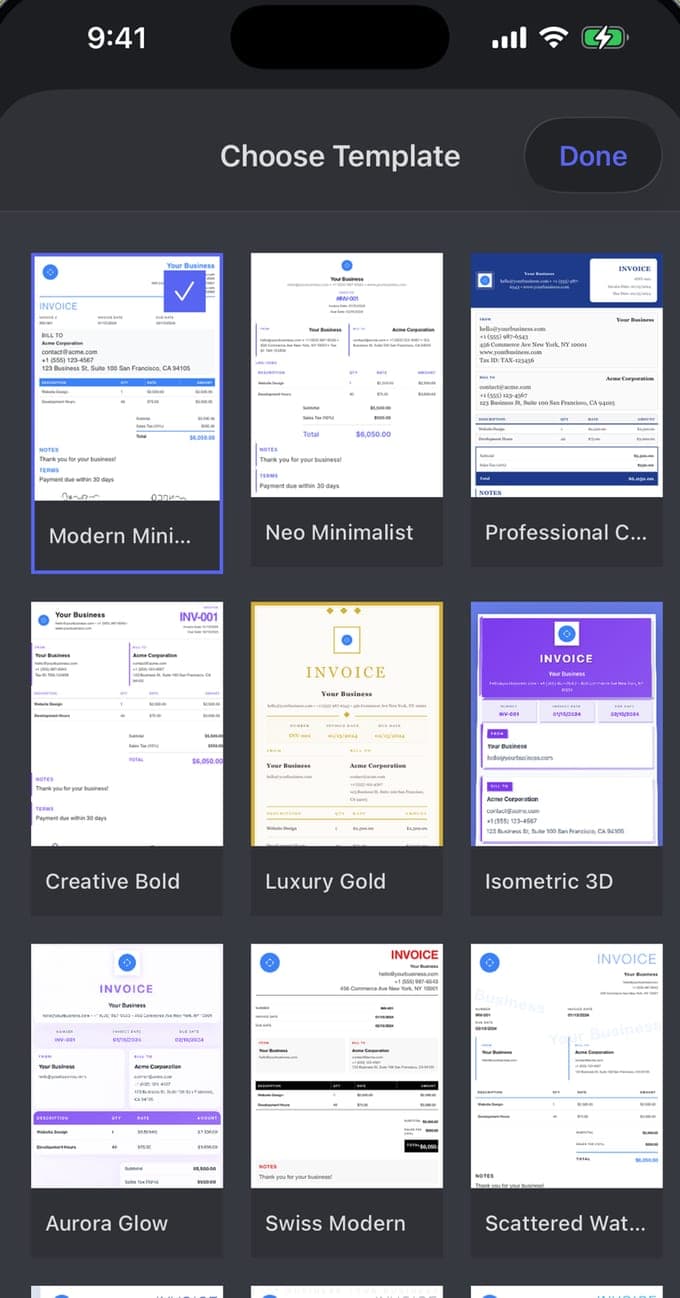
Invoice Pro's Choose Template sheet holds 37 designs, among them Professional Classic, Swiss Modern, Luxury Gold and Aurora Glow. Your wording stays put while you flick between them, so you can settle the layout once the numbers are right. Add your logo and business details and the app carries them through.
LINE ITEMS
Sales tax on an invoice, line by line
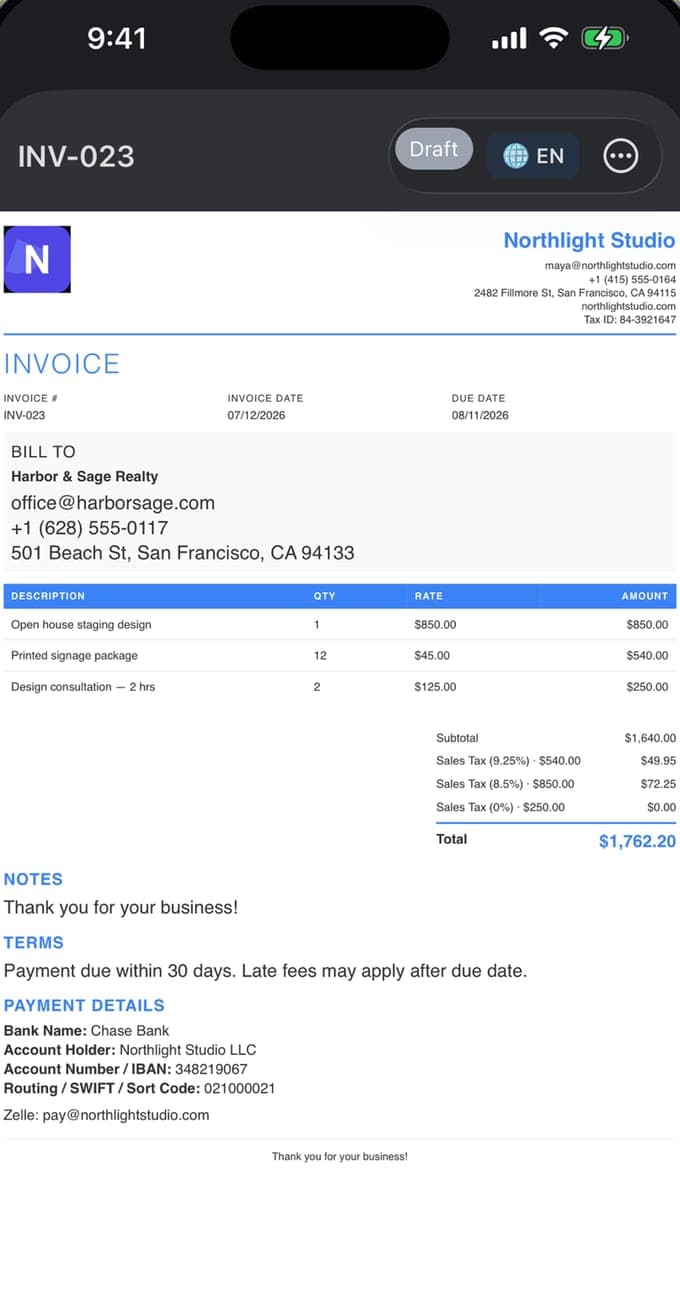
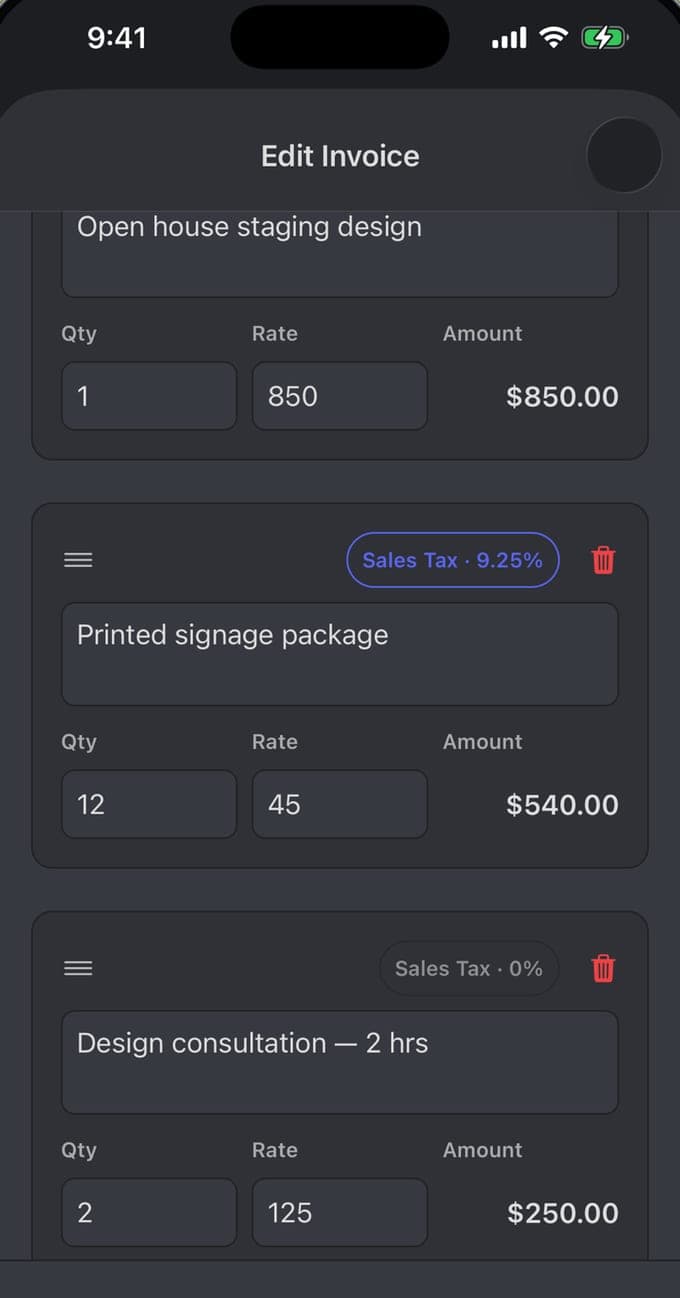
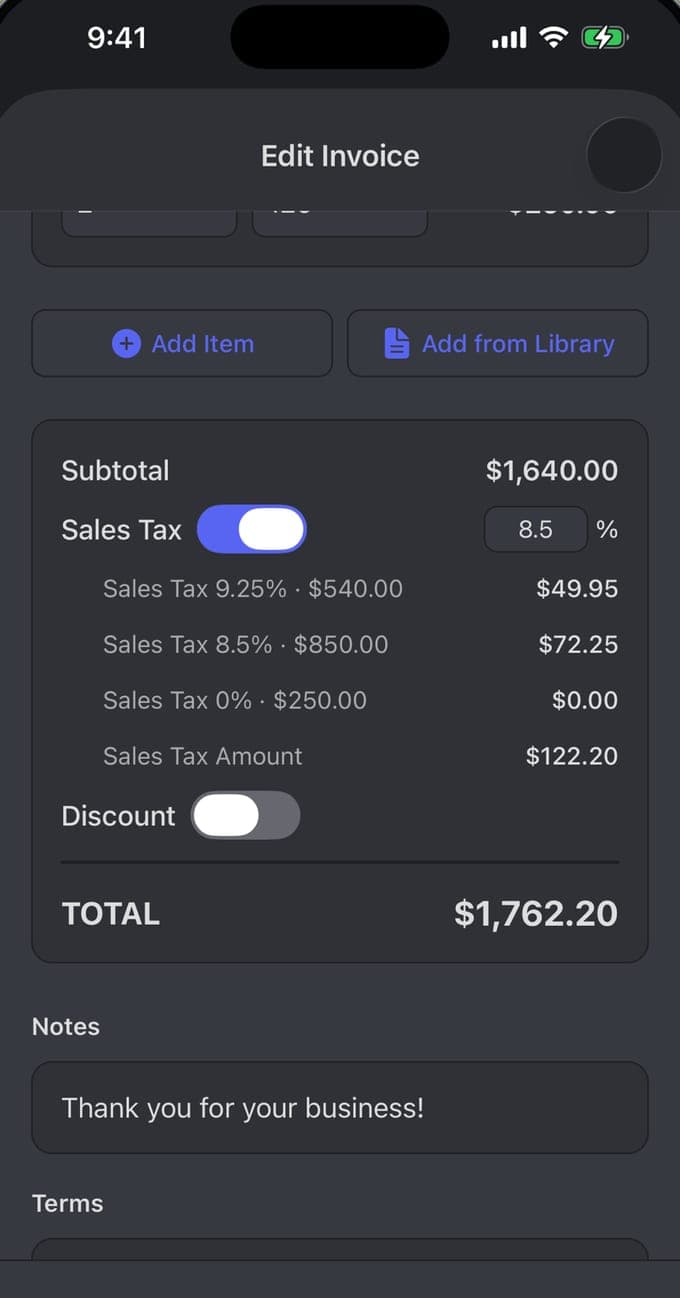
Each row on an invoice carries its own description, quantity, rate and tax badge, so a job at 9.25% and a part at 8.5% can sit on the same document. Invoice Pro totals each rate separately: $49.95 at 9.25%, $72.25 at 8.5%, nothing on the zero-rated line. Discounts apply on top.
ESTIMATES TO PAYMENT
From estimate to payment tracking
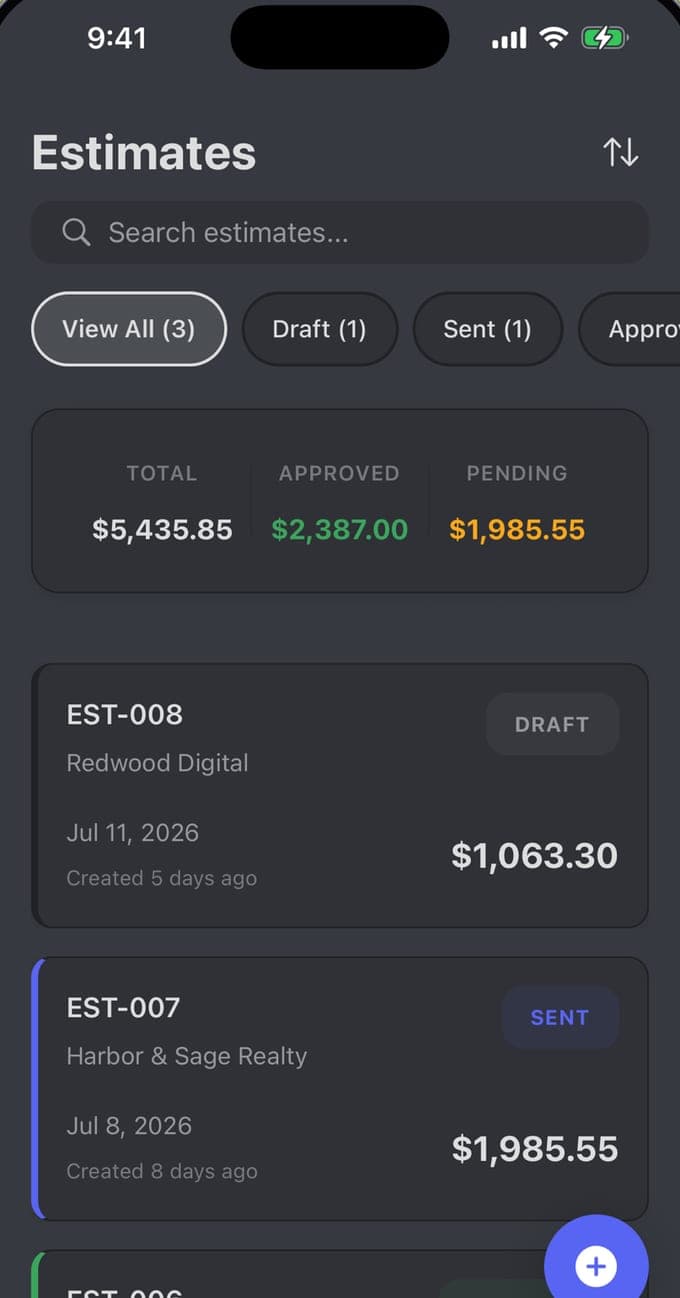
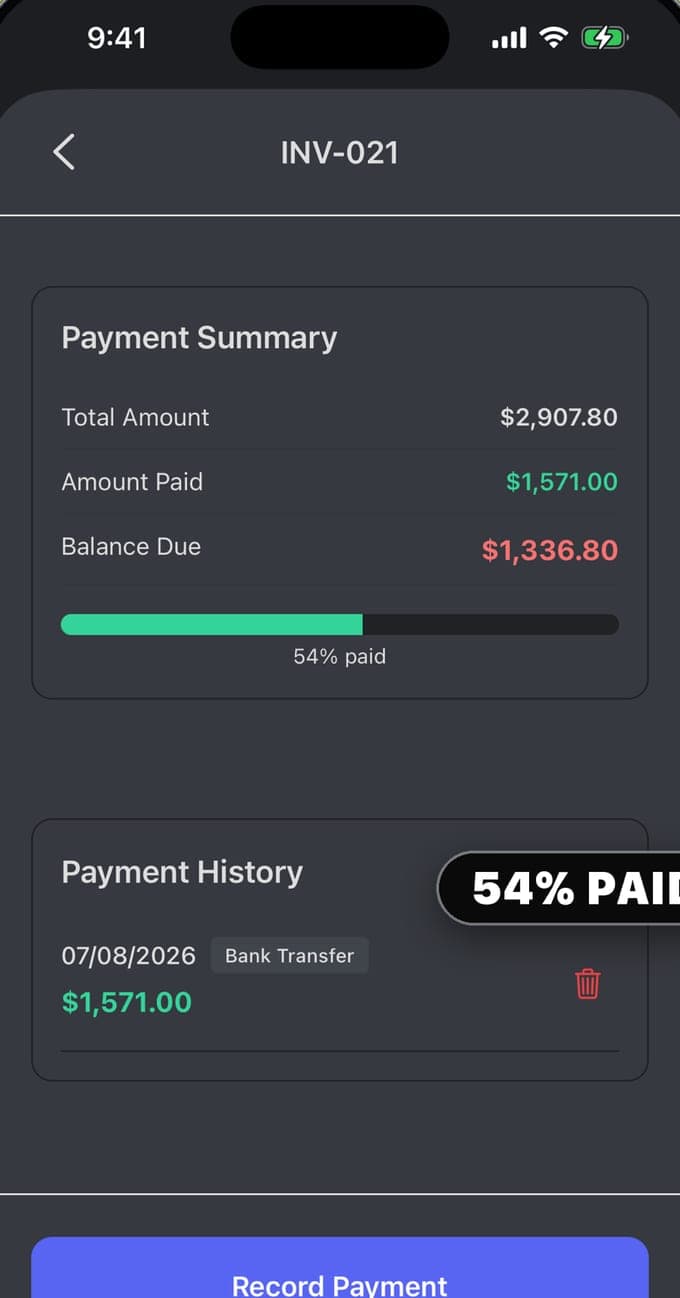
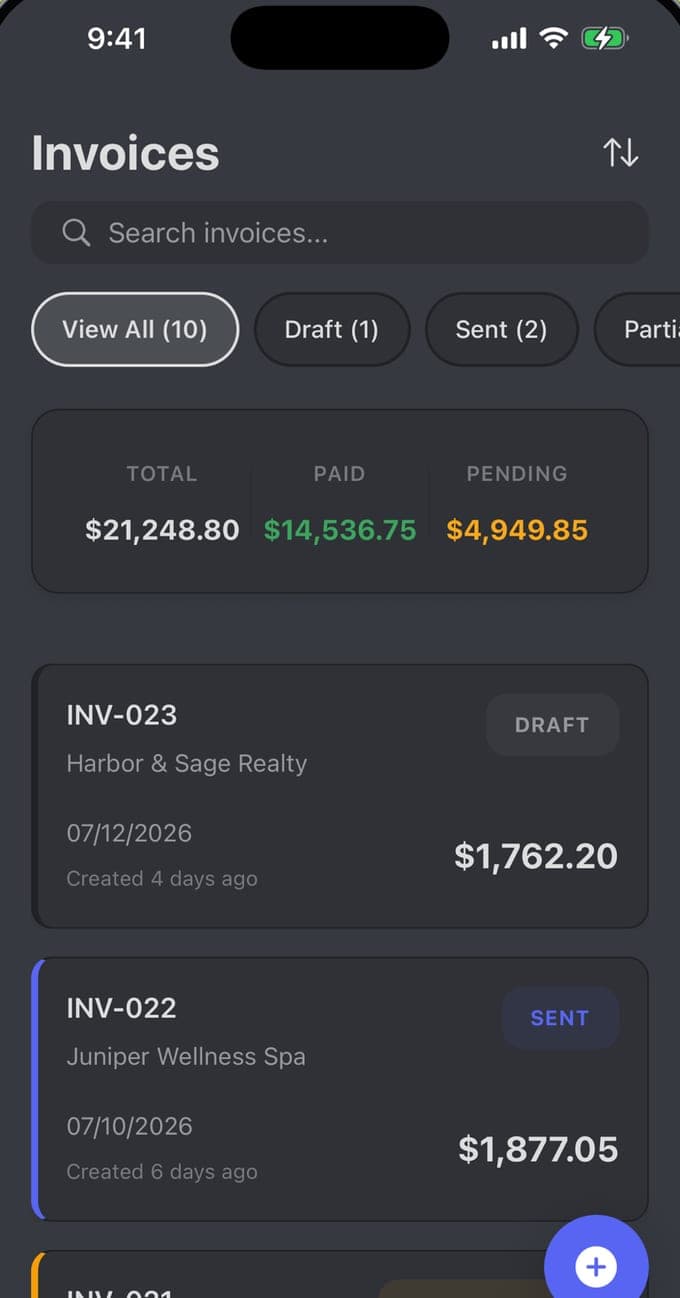
Estimates keep their own list and their own totals: $5,435.85 out, $2,387.00 of it approved. Invoices sort by draft, sent or partially paid. Record a payment with its date and method and Invoice Pro holds the balance due: $1,571.00 of $2,907.80 reads as 54% paid, and a receipt comes out of the same screen.
OFFLINE AND PRIVATE
An offline invoice app with client management
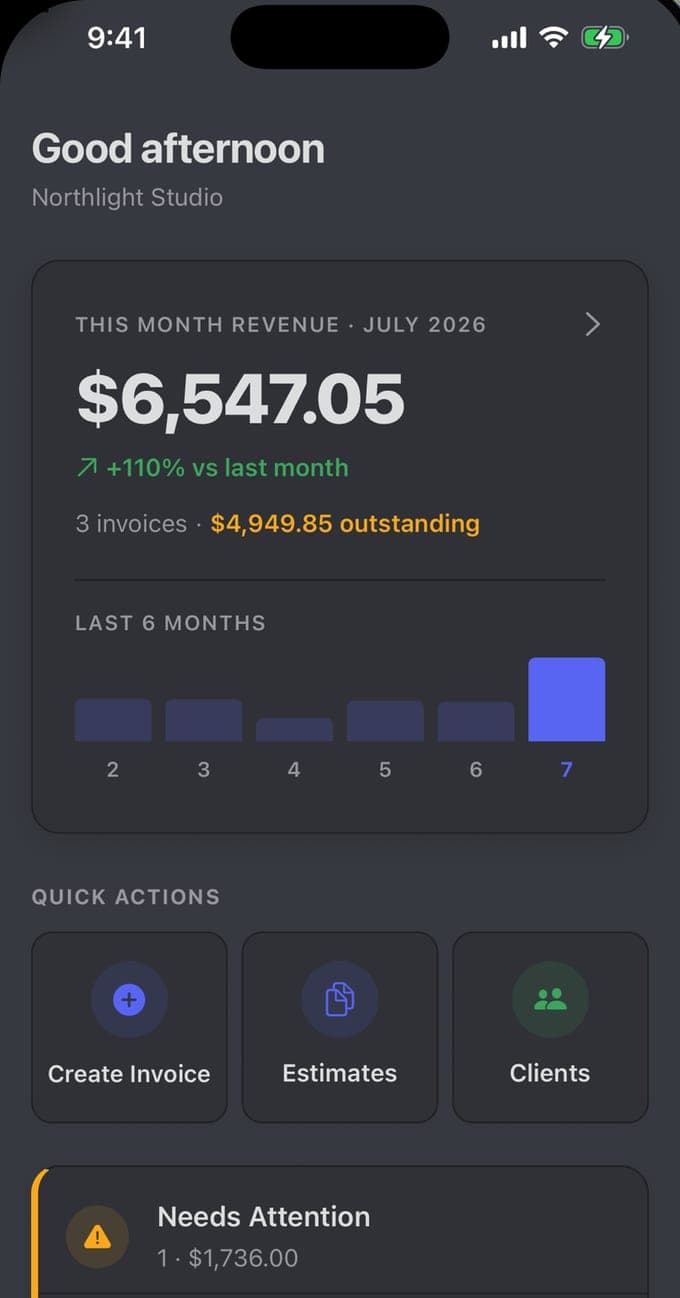
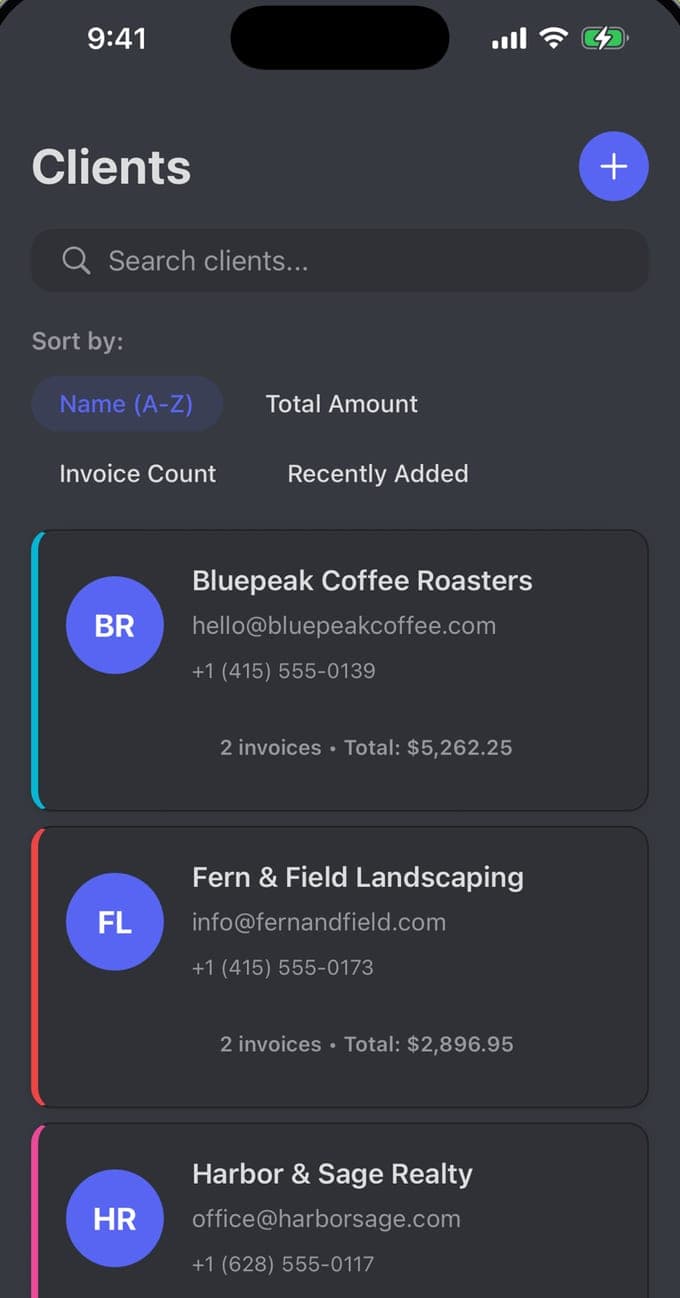
Everything Invoice Pro writes lives on the iPhone or iPad it was written on. A client site with no signal works exactly like a desk with fibre. The home screen totals the month as you go, and each client record holds an email, a phone number, an invoice count and a lifetime total.
How it works
Install to sent PDF.
01
Set your business details once
Download Invoice Pro from the App Store on an iPhone or iPad running iOS 15.1 or later. Add your logo, business details, Tax ID and bank payment details once, and every document picks them up.
02
Build the invoice
Pick a client or add one, then add line items with quantity and rate. Set a sales tax rate for the document or per row, add a discount where one is due, and the totals work themselves out.
03
Share the PDF
Preview the invoice, switch templates until one fits, then generate the PDF and share it from the iOS share sheet. It renders in any of 19 languages, with 150+ currencies available. The app does not email clients for you.
Guides
How to invoice, written out properly.
Eight guides on the parts of invoicing people actually search for, from what a valid invoice has to carry to charging two tax rates on one job.
 How to make an invoice on iPhoneMake an invoice on your iPhone in six steps: line items, sales tax, totals and a shareable PDF. Plus what Apple Numbers makes you retype every month.Read the guide →
 What to include on an invoiceEvery field a valid invoice needs: invoice number, due date, tax ID, itemised lines and payment details, plus why each one is there.Read the guide →
 How to add sales tax to an invoice, line by lineAdd sales tax to an invoice line by line, with a different rate per item and each rate shown separately on the PDF. Worked example on a $1,640 invoice.Read the guide →
 How to write an invoice for freelance workWrite a freelance invoice that survives a query weeks later: describing the work, hourly versus fixed-fee lines, deposits, and a client record you reuse.Read the guide →
 The difference between an estimate, a quote and an invoiceAn estimate is an informed guess, a quote is a fixed price a client can accept, an invoice demands payment for finished work. What changes between them.Read the guide →
 How to invoice as a contractor on a job that runs for weeksHow to invoice as a contractor: quote the job, split materials from labour, bill in stages, handle retention, and tie every invoice to the contract dates.Read the guide →
 How to get clients to pay invoices on timeClear payment terms, invoicing the day you finish, and a chase sequence that starts before the due date. How to get clients to pay invoices on time.Read the guide →
 How to write a receipt for a partial paymentA partial payment receipt must state the amount received, the date, the method, the invoice it paid and the balance left. Wording and a worked example.Read the guide →
Questions
Common questions.
Is Invoice Pro free to use?
Yes, with unlimited invoices and estimates on the free tier and all 37 templates available; free PDFs carry a small watermark. Premium removes the watermark and adds signature capture, payment reminders and due-date alerts, after a three-day trial. You then choose a weekly subscription or a one-time lifetime price, and the amount varies by region.
Can I create an invoice on an iPhone with no internet connection?
Yes. Invoice Pro runs on the device, so you can write the invoice, work out the tax and generate the PDF with the phone in aeroplane mode; a connection is needed only for whatever you use to send the file. The app is iPhone and iPad only, on iOS 15.1 or later, with no Android or web version.
Learn more →What has to be on an invoice for it to count as valid?
Most jurisdictions expect a unique invoice number, the issue date, your business name and contact details, the client's details, an itemised description of what you supplied, the amount due and the payment terms. If you charge sales tax, or VAT depending on where you are, you normally also need your tax registration number and the tax shown separately. The exact list is set by your own country's rules, so check them rather than relying on a template alone.
Learn more →Can I charge a different sales tax rate on each line item?
Yes. Invoice Pro puts a tax badge on each line, so one row can sit at 9.25%, another at 8.5% and a third at 0%. The PDF then breaks the tax out by rate, which is what a mixed goods-and-labour job usually needs. Which rate applies to which item is a local rule, so confirm it with your tax authority or accountant.
Learn more →What is the difference between an estimate, a quote and an invoice?
An estimate is your best figure before the work is fully scoped and it can move; a quote is a fixed price you are offering to stand behind; an invoice is the request for payment once the work is delivered. In Invoice Pro, estimates sit in their own tab with draft, sent and approved states, so the client's approval is on record before you bill.
Learn more →What should a freelancer put on an invoice?
Beyond the usual header details, freelance invoices read better when each line names the deliverable and the period, such as "Landing page copy, August 2026", with the rate and hours or a fixed fee beside it. Add payment terms and your bank details, and keep invoice numbers sequential so your year-end reconciles. Invoice Pro stores client records with lifetime totals, so a repeat client is a couple of taps.
Learn more →How should an independent contractor invoice a client?
Send an estimate first and get it approved in writing, then invoice against that approved scope so any variation is visible. Contractors in the United States are usually also asked for a W-9 so the client can issue a 1099; other countries have their own equivalent, so check what yours requires. Invoice Pro keeps estimates and contracts in separate tabs, with effective and completion dates on the contract.
Learn more →What can I do about clients who always pay late?
Shorten the terms and put the due date on the face of the invoice, then chase on a fixed schedule instead of when you happen to remember. Premium in Invoice Pro sends payment reminders and due-date alerts, and the invoice list filters down to what is still pending, so the arrears sit on one screen.
Learn more →Can I issue a receipt for a partial payment?
Yes. Record the amount received against the invoice with its date and method, and Invoice Pro generates a receipt for that payment while holding the balance due on the invoice. A partial-payment receipt should show what was paid, what it was paid against and how much is still outstanding.
Learn more →Download
Invoice Pro, free on the App Store
Unlimited invoices and estimates, 37 templates and per-line sales tax, on iPhone and iPad running iOS 15.1 or later. The free tier watermarks the PDF; everything else is there from the first invoice.