How to add sales tax to an invoice, line by line
Vishwen Labs

Add sales tax to an invoice by putting the rate on the line items it applies to, then showing the tax as its own row between the subtotal and the total. One rate across the whole invoice needs one tax line. An invoice that mixes a taxable good with an exempt consulting hour needs a rate per line, and the finished document should show each rate on its own.
Add sales tax to an invoice with a different rate per line item
- Enter the line items first. Add each item with its description, quantity and rate. Invoice Pro computes the amount for the row and the subtotal underneath, so you are applying tax to figures that are already settled.
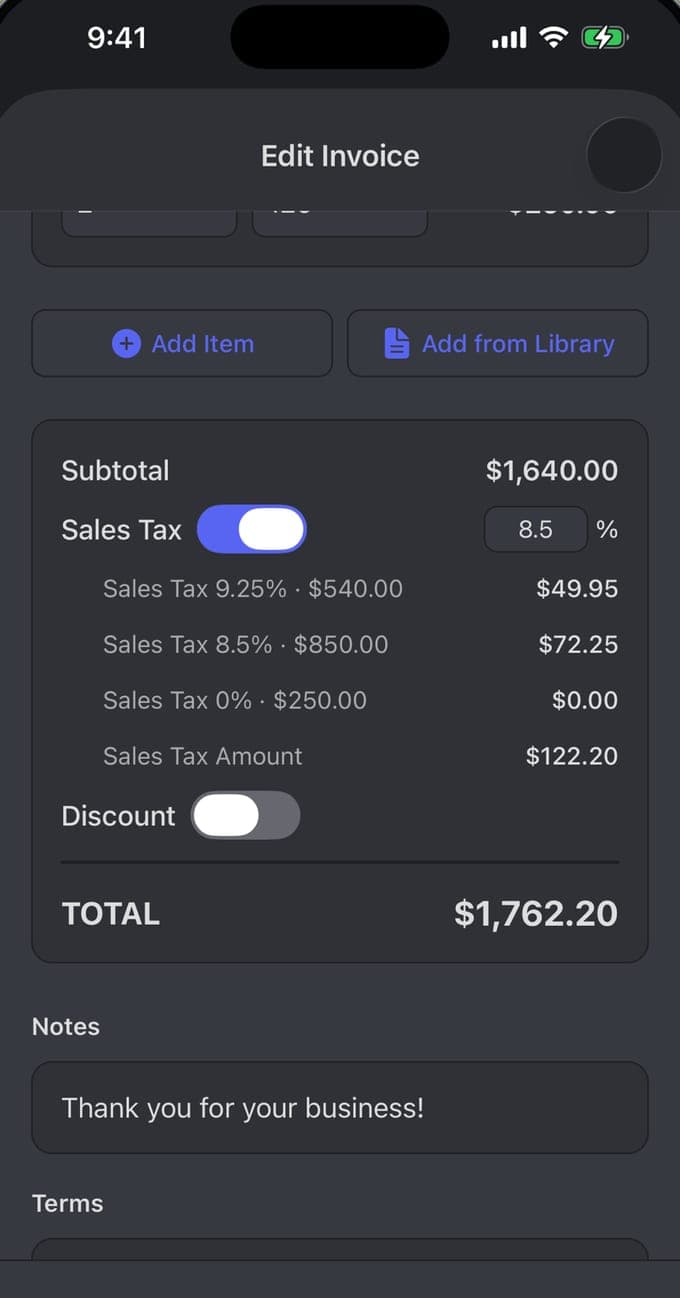
- Turn on sales tax and set a default rate. In the totals block, switch Sales Tax on and enter the rate that covers most of your work. New rows pick it up automatically, which saves you choosing a rate by hand on every line.
- Override the rows that differ. Open any line whose treatment is different and give it its own rate. Exempt work takes 0%, which stays on the document as a visible zero instead of vanishing.
- Check the per-line breakdown. Under the subtotal, confirm each rate against the amount it was charged on. On a $1,640.00 subtotal, 9.25% on $540.00 gives $49.95, 8.5% on $850.00 gives $72.25 and 0% on $250.00 gives nothing, for $122.20 of tax and a $1,762.20 total.
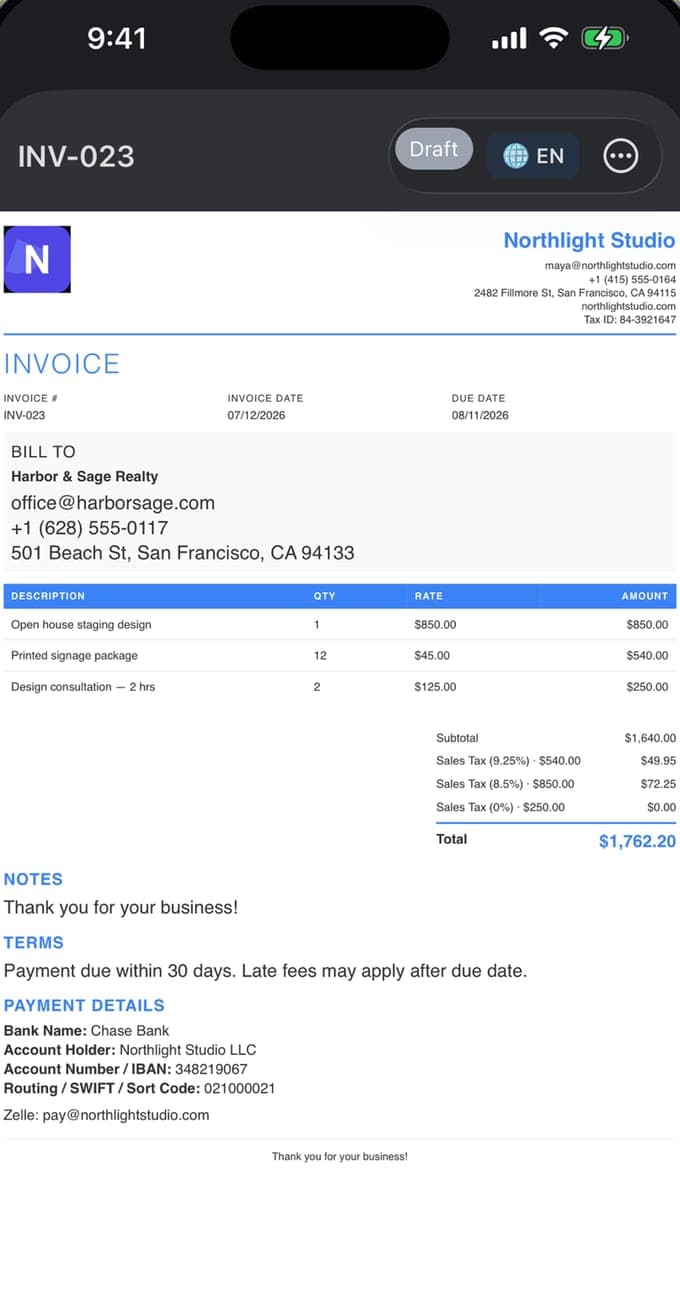
- Preview the PDF and read the tax rows. Open the preview and check the document as your client will see it: subtotal, one row per distinct rate, then the total. The app generates the PDF and shares it from there.
What a sales tax line on an invoice has to show
Anyone reading your invoice later, a client's bookkeeper or a tax officer two years from now, should be able to redo the arithmetic without ringing you. That means the tax sits on its own row, below the subtotal and above the total, with the rate spelled out in full.
Tax folded into the unit price is normal in some countries and required in a few. Where you have the choice, quoting before tax and adding it at the foot shortens arguments, because the client can see which part of the total is yours and which part belongs to the state.
- The rate as a percentage. Write 9.25%, so the figure can be checked against the money.
- The amount that rate produced, on a row of its own.
- The base it was charged on, so a reader can see that $49.95 came from $540.00.
- Your tax registration number, where your country issues one. Invoice Pro carries this as a Tax ID in the business header.
When one invoice needs more than one sales tax rate
A cabinet maker delivers $540.00 of finished panels, installs them for $850.00 in a neighbouring county, and bills $250.00 for a design consultation. Sales tax attaches to what was sold and where it was sold, so a single invoice covering more than one kind of work rarely carries a single rate. The mixed cases are ordinary rather than exotic:
Averaging is the wrong move. Apply a blended 8.9% to all three lines and no figure on the invoice matches what any authority is actually owed, which is the sort of thing that surfaces during an audit long after the job is finished.
- A taxable physical good beside an exempt professional hour. Materials are usually taxable; advice often is not.
- Two jurisdictions in one job, where the goods are delivered to one county and the work is performed in another.
- A client holding an exemption certificate for stock they resell, but paying tax on everything else you supply.
- Delivery and shipping charges, which some US states tax and some leave alone.
How to add sales tax to an invoice line by line
Invoice Pro attaches the rate to each row. In the editor, a line item carries its description, quantity and rate, a computed amount, and its own tax badge reading Sales Tax · 9.25%. You set the rate you use most as a default, then override only the rows that behave differently.
Zero is a rate, and it should stay visible. A line showing 0% tells the client the exemption was deliberate, which is worth considerably more than a line with no mention of tax at all.
How sales tax should appear on the finished PDF invoice
The preview is the document your client keeps, so read it the way they will. Subtotal, then one row for each distinct rate, then the total. Grouping by rate keeps a twenty-line invoice legible while a reader can still match each percentage back to the rows carrying it.
Above the table sits the header block: logo, business name, email, phone, website and Tax ID. Below it come the notes, the terms, and the payment details, with bank name, account holder, account number or IBAN, and the routing, SWIFT or sort code your client needs. Invoice Pro renders the same invoice in 19 languages and across 150+ currencies, which earns its keep the moment a job crosses a border and the tax has to be named twice.
Sales tax rates are local, and this is not tax advice
Everything above concerns presentation. Whether you have to charge sales tax at all, at what rate, and on which of your services, depends on where you are registered and where the work lands, and that is a question for your local tax authority or an accountant who knows your state. Treat this guide as a formatting guide and nothing more.
Two habits are worth keeping. Record the rate on the invoice itself rather than in a spreadsheet somewhere else, because rates change and a 2025 invoice has to show the 2025 figure. Then keep the file: Invoice Pro stores records on the device and works with no internet connection, so the PDF you shared in March is the one you can produce in November.
Questions people also ask
Can a single invoice have two different sales tax rates?
Yes, and some jobs require it. Tax follows what was sold and where it was sold, so a delivered good and an on-site service can sit on one document under different rates. Invoice Pro holds a rate on each line item and then prints one tax row per distinct rate beneath the subtotal, so $49.95 at 9.25% and $72.25 at 8.5% stay separately visible.
Should sales tax be calculated before or after a discount on an invoice?
For a discount you grant the customer yourself, most US states have you charge tax on the discounted amount, since that is the price actually paid. Manufacturer coupons and rebates are frequently treated the other way round. The rule belongs to your state or country, so confirm it before you fix the order of operations on your invoice template.