How to catalog your Yu-Gi-Oh collection
Vishwen Labs

Catalog a Yu-Gi-Oh collection by recording each card as a specific print, set code and rarity, with a condition and a quantity, and keeping the physical storage in the same order as the list. Done that way the collection has a value you can quote, a wishlist that stops you buying a card you already own, and decks that come out of the pile without dismantling it. A scanner app does the identification from a photo, one card at a time or as a queue; the judgement about condition and the discipline about storage are yours. A binder a week is a sustainable pace.
Cataloguing a Yu-Gi-Oh collection
- Sort the pile by set code. Group cards by the set abbreviation under the artwork, LOB, MRD, SDY and so on, then by number within each set. Foils and anything old get a sleeve now; bulk Commons go in set order in a box.
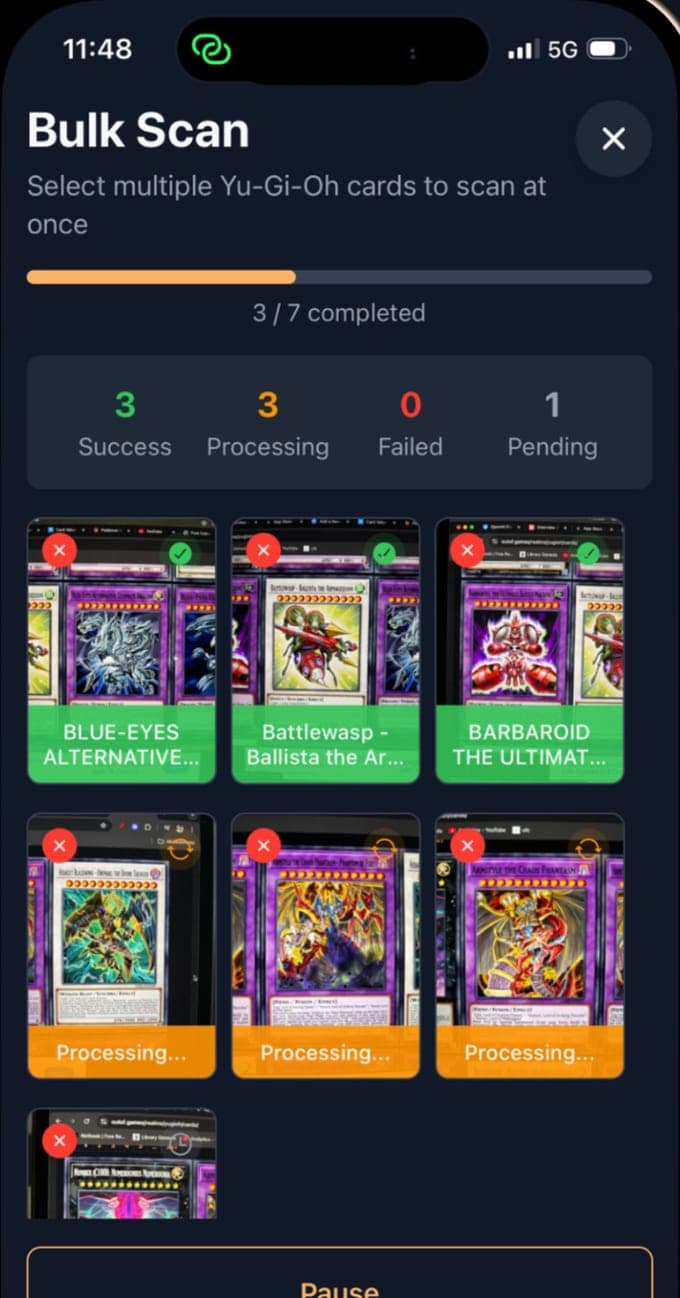
- Scan or search each card. Photograph each card flat under good light, or queue a stack in bulk mode, which works through the photos three at a time. For bulk Commons, search the database by name instead of photographing them.
- Confirm the print and the rarity. Check the set code the app read against the card, and pick the right set and rarity from the card's set list: the same name can be a Common in one set and a Secret Rare in another.
- Record condition and quantity. Judge the condition under a light, front and back, and enter it with the number of copies. This is what turns a list into a valued collection.
- Put the wants on the wishlist. Cards you are chasing go on the wishlist rather than in the collection, so the collection's value stays honest and the wishlist is the shopping list.
- Build decks from the catalogue. Put the cards you play into decks in the app, main, extra and side, so a deck box's contents are known and its value is on the deck. The builder flags a main deck under 40 or over 60 and a fourth copy.
- Store to match, export and back up. Binders by set in number order, top-loaders for the valuable few, deck boxes labelled. Export the collection to CSV and keep a copy off the phone; repeat after every big session.
Why prints, not names
A collection catalogued by name is a list of Dark Magicians; a collection catalogued by print is a list of specific cards with specific prices. The difference is the set code under the artwork plus the rarity, and in this game it is the whole difference: the marketplaces price each set's printing of a card separately, and the app's per-set price list follows them. The set-code guide explains how to read the code when a card is worn, and the app lists a card's sets for you to choose from when the photo was unsure.
Bulk scanning, honestly
The app's bulk mode is a queue: you photograph cards one after another, or pick photos from the library, and it identifies them three at a time in the background while you keep shooting. It does not read several cards from one photograph. For a stack of foils that is the fastest way through; for a box of played Commons it is still slower than counting the box and moving on.
What not to catalogue
Not every card needs a row. Hundreds of played Commons from a modern set are worth cents each and are better recorded as a box than scanned one by one. Catalogue what is worth finding again: every foil, every card from the game's first years, every promotional card, every card that is Limited or that a deck needs, and anything a buyer would ask about. The free tier's ten scans a month cover the valuable few of a small collection; Premium covers a binder a night.
Decks are the reason most people catalogue
A deck is a main deck of 40 to 60 cards, an extra deck of up to 15 and a side deck of up to 15, and a deck box on the shelf is a collection whose contents you have forgotten. Building the deck in the app from the cards you own means the deck box is documented, its value is known, and the copy limits are checked. The deck guide covers the sizes, the three-copy rule and the Forbidden & Limited List the app does not check.
Keeping it current
A catalogue decays the moment you trade. Scan a card in when it arrives, mark it sold when it leaves, move a chased card from the wishlist to the collection the day it lands, and re-check the condition of anything that has been played. Prices refresh themselves; the list only stays true if you do.
Yu-Gi-Oh Card Scanner is an unofficial, fan-made app from Vishwen Labs. It is not authorized, licensed or endorsed by Konami, Studio Dice, SHUEISHA or TV TOKYO, and Yu-Gi-Oh! and all related names, marks and card artwork belong to their owners. Card data and prices come from the public sources named on these pages, and nothing here is advice to buy, sell or grade a card.
Questions people also ask
What is the fastest way to catalog a lot of Yu-Gi-Oh cards?
Sort by set code first, then scan the cards worth a row, one photo per card, using bulk mode to queue them, and record bulk Commons as a box. Searching the database by name is quicker still for cards you can identify by eye.
Does bulk scan read several cards from one photo?
No. Bulk mode queues one photo per card and identifies them three at a time in the background. Photograph each card, or a stack one card at a time, and let the queue work.